Introduction
In many classrooms, teachers notice that not all students learn in the same way. Some students prefer visual information, while others understand better through discussion, hands-on activities, or written instructions.
Universal Design for Learning (UDL) is a teaching approach that recognises this diversity. Instead of designing a lesson for one type of learner and then adding accommodations later, UDL encourages teachers to design lessons from the beginning that allow multiple ways for students to engage, understand, and demonstrate learning.
This proactive approach can reduce barriers for many students, including autistic learners, multilingual students, and students with different learning preferences.
UDL does not mean creating completely different lessons for every student. Instead, it means building flexibility into lessons so more students can participate successfully.
A. Easy – Explanation of UDL
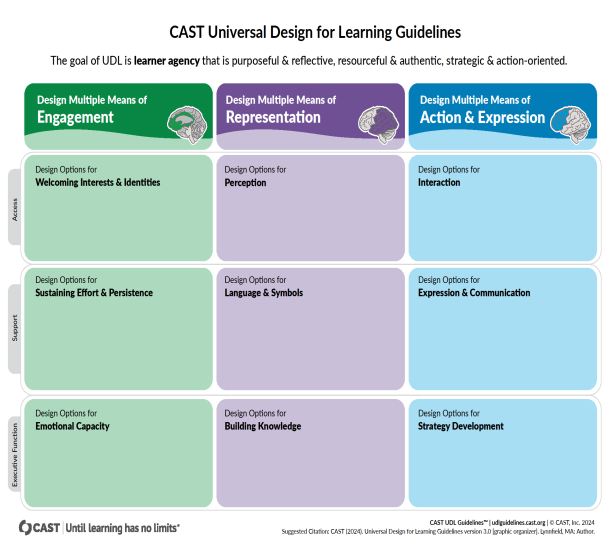
Universal Design for Learning is based on three main principles.
1. Multiple Means of Engagement
(Why students learn)
Students are motivated by different things. Some enjoy group work, while others prefer independent tasks. Some students are interested in visual materials, while others prefer discussion or exploration.
UDL encourages teachers to provide different ways for students to become interested and engaged in learning.
Examples include:
- Choice in activities
- Opportunities for collaboration or independent work
- Connecting lessons to student interests
2. Multiple Means of Representation
(How students receive information)
Students understand information differently. Some learners benefit from visual explanations, while others prefer written instructions or demonstrations.
UDL encourages teachers to present information in multiple formats so more students can understand the content.
Examples include:
- Visual diagrams
- Written instructions
- Demonstrations
- Videos or images
3. Multiple Means of Expression
(How students show learning)
Students also express understanding in different ways.
Instead of requiring every student to complete the same format, UDL allows students to demonstrate learning through different forms.
Examples include:
- Writing
- Drawing
- Oral explanations
- Presentations
- Concept maps
This flexibility allows students to show what they know without unnecessary barriers.
Teachers can use this Diagram made by CAST:
Why UDL Supports Inclusive Classrooms
Inclusive classrooms include students with a wide range of abilities, communication styles, and sensory needs.
UDL helps teachers design lessons that are flexible from the start.
This can reduce situations where students feel excluded because the learning format does not match their needs.
For autistic learners, UDL may support:
- clearer instructions
- predictable structures
- visual supports
- choice in participation
When these elements are part of lesson design, classrooms become more accessible for many learners.
B. UDL Lesson Templates
The following lesson formats can help teachers incorporate UDL principles into their planning.
Choice-Based Activity Model
In this model, students choose from several learning options that address the same learning goal.
Example options:
- Create a diagram explaining a concept
- Write a short explanation
- Build a visual poster
- Record a short verbal explanation
Choice increases engagement and allows students to use their strengths.
Flexible Assessment Model
Assessment focuses on understanding rather than one specific product.
Students may demonstrate learning through:
- written responses
- presentations
- visual explanations
- short reflections
Teachers assess the conceptual understanding, not just the format.
Visual and Multimodal Instruction Model
Lessons include multiple ways of presenting information.
Examples:
- teacher explanation
- images or diagrams
- short videos
- written instructions
Providing more than one format helps students who process information differently.
C. Side-by-Side Lesson Redesign
Traditional Lesson Format
Teacher explains a concept verbally.
Students read a textbook section.
Students write a paragraph explaining the concept.
Potential barriers:
- heavy reliance on verbal instruction
- limited engagement options
- single assessment format
UDL-Enhanced Lesson Format
Teacher introduces the concept using images and short explanation.
Students explore the topic through:
- short reading
- visual diagram
- small group discussion
Students demonstrate understanding by choosing one option:
- write a short explanation
- create a labelled diagram
- present verbally
- create a concept map
This approach allows students to access and express learning in different ways.
D. Barrier and Solution Table
| Classroom Barrier | UDL Adjustment |
| Single-format assessment | Offer multiple expression options |
| Long verbal instructions | Provide written and visual supports |
| One pace for all students | Allow flexible pacing |
| Rigid grouping | Offer independent or collaborative options |
| Limited engagement | Include choice-based activities |
These adjustments often benefit many students, not only those with identified learning needs.
E. Implementation Roadmap
Teachers do not need to redesign every lesson immediately. UDL can be introduced gradually.
Step 1: Start Small
Choose one lesson and add one flexible element, such as allowing two different response formats.
Step 2: Add Multiple Representations
Include visual or written instructions alongside verbal explanations.
Step 3: Introduce Student Choice
Offer options for how students participate in activities.
Step 4: Reflect and Adjust
After teaching a lesson, reflect on what worked well and what could be improved.
Gradual changes can lead to more inclusive classroom practices over time.
F. Short Videos
Optional Reflection for Teachers
After exploring this page, teachers may consider:
- Which part of my lessons might create barriers for some students?
- How could I add one flexible option to improve accessibility?
- What small change could I try in my next lesson?